Understanding Apache Kafka: Powering Real-Time Data Streaming

I'm Aditya Pippal, a Pre-final year Electronics and Communication Engineering student at UIET, Punjab University. I'm a passionate web developer on a mission to master the intricacies of full-stack development. With a keen interest in technologies like React, Node.js, and MongoDB, I find joy in crafting seamless digital experiences. My journey is fueled by a love for problem-solving and a commitment to staying on the cutting edge of web development. From delving into server-side scripting to perfecting user interfaces, I believe in the power of clean code and continuous learning. Join me in this exciting adventure of building, innovating, and making a positive impact in the ever-evolving world of web development! 🚀🌐 #WebDeveloper #CodePassion #TechEnthusiast #FullStackDev
In today’s fast-paced world, apps like Zomato, Rapido, or Uber handle millions of data events per second — orders, live tracking, user interactions, and more. How do they manage such massive real-time data flow efficiently without losing messages or overloading servers?
That’s where Apache Kafka comes in — a high-performance distributed streaming platform designed for building real-time data pipelines and streaming applications.
Problem Statement: Real-Time Data Chaos (Zomato Example)
Imagine Zomato, a popular food delivery app. Every second:
Thousands of customers place new orders.
Restaurants update their menus or availability.
Delivery partners share live GPS locations.
Users refresh their app to track order progress.
All these events happen simultaneously and need to be:
Processed in real-time
Delivered reliably to multiple services (e.g., notification service, analytics, tracking)
Scalable enough to handle traffic spikes (like during lunch hours)
Traditional databases or REST APIs can’t efficiently handle this kind of event-driven, high-throughput data flow.
Problem:
How do we ensure millions of messages per second are:
Not lost,
Delivered quickly,
And available to multiple services simultaneously?
How Kafka Solves It
Apache Kafka acts as a central event hub — a distributed system where data (messages/events) flow from producers to consumers in real-time.
Instead of tightly coupling services (like the restaurant service talking directly to the delivery service), Kafka allows all of them to communicate asynchronously through topics.
Kafka’s key strengths:
High Throughput & Scalability — Handles millions of events per second.
Fault Tolerance — Messages are replicated across brokers.
Durability — Data is persisted on disk.
Decoupling — Producers and consumers are independent.
Real-Time Stream Processing — Enables analytics and transformations on the fly.
So in Zomato’s case:
The order service produces an event (“New Order Created”).
Kafka stores it in an “orders” topic.
The delivery service, notification service, and analytics system all consume that event at their own pace.
Kafka Architecture Explained
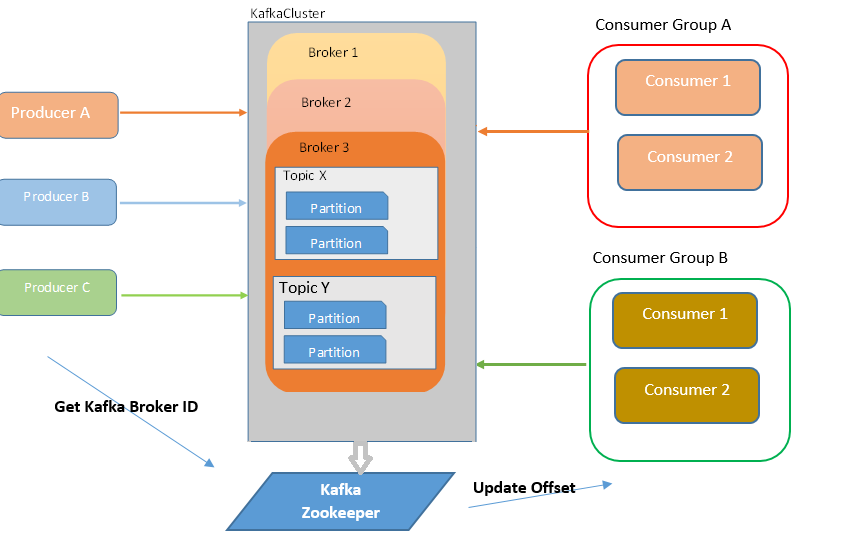
Kafka’s architecture is built around a few core components:
1. Producer
A Producer is any application or service that sends data (events or messages) to Kafka topics.
For example, Zomato’s order service sends every new order event to Kafka.
Order Created → Kafka Topic: "orders"
2. Topics
A Topic is like a channel or category where messages are published.
Kafka stores messages in topics — e.g., orders, payments, locations.
Each topic is split into multiple partitions, allowing parallel processing.
3. Partitions
A Partition is a subset of a topic. Each partition is ordered and immutable.
Having multiple partitions helps Kafka achieve scalability and load balancing.
Example:
Topic: orders
│
├── Partition 0 → Order #1001, #1002
├── Partition 1 → Order #1003, #1004
└── Partition 2 → Order #1005, #1006
4. Broker
A Broker is a Kafka server. A Kafka cluster usually has multiple brokers to handle load and ensure reliability.
5. Consumer
A Consumer reads messages from topics. Each consumer can subscribe to one or more topics.
Consumer Groups
A Consumer Group is a collection of consumers working together to process data from a topic.
Kafka ensures:
Each partition in a topic is consumed by only one consumer in a group.
Different groups can consume the same data independently.
Example:
Consumer Group A (for analytics)
Consumer Group B (for notifications)
Both groups can read the same “orders” topic but process it differently.
How Load Balancing & Self-Balancing Works in Consumer Groups
When you have multiple consumers in the same group, Kafka automatically balances which consumer reads from which partition. This ensures even load distribution and fault tolerance.
Let’s break it down-
1. Initial Assignment
When a consumer group first subscribes to a topic:
Kafka assigns partitions to consumers.
If you have 6 partitions and 3 consumers, each consumer might handle 2 partitions.
Example:
Consumer 1 → partitions [0,1]
Consumer 2 → partitions [2,3]
Consumer 3 → partitions [4,5]
2. Rebalancing (Self-Balancing)
Kafka continuously monitors the health and membership of the consumer group via a Group Coordinator (a special broker responsible for managing groups).
A rebalance happens when:
A new consumer joins the group.
A consumer leaves or fails (e.g., crashes).
A topic’s partitions change (added or removed).
When any of these events occur:
The Group Coordinator pauses consumption.
It reassigns partitions evenly across the active consumers.
Consumption resumes automatically with new assignments.
This process is called self-balancing, because Kafka dynamically adjusts load without manual intervention.
Example of Rebalancing
Continuing the earlier example:
If Consumer 3 crashes:
Before crash:
C1 → [0,1]
C2 → [2,3]
C3 → [4,5]
After crash (rebalance):
C1 → [0,1,4]
C2 → [2,3,5]
Kafka redistributes the partitions so that no messages are left unprocessed.
Balancing Strategies
Kafka supports different partition assignment strategies, such as:
RangeAssignor — Assigns sequential partitions to consumers.
RoundRobinAssignor — Distributes partitions evenly.
StickyAssignor — Minimizes reassignments to avoid unnecessary data movement.
Most modern clients (like kafkajs, Java, Python, etc.) use StickyAssignor by default for better stability.
Why Balancing Matters
Proper balancing ensures:
Scalability → Adding consumers increases throughput linearly.
Fault Tolerance → If one consumer dies, others take over.
Efficiency → Workload distributed evenly across consumers.
This self-balancing mechanism is one of Kafka’s key features, ensuring your data pipelines stay stable even as services dynamically scale up or down.
Running Kafka with Docker, Zookeeper, and Node.js Example
Here’s a simple setup to run Kafka locally and send/receive messages using Node.js.
1. Docker Compose Setup
Create a file named docker-compose.yml:
version: '3.8'
services:
  zookeeper:
    image: wurstmeister/zookeeper:3.4.6
    ports:
      - "2181:2181"

  kafka:
    image: wurstmeister/kafka:2.13-2.8.0
    ports:
      - "9092:9092"
    environment:
      KAFKA_ADVERTISED_HOST_NAME: localhost
      KAFKA_ZOOKEEPER_CONNECT: zookeeper:2181
    depends_on:
      - zookeeper
Then run:
docker-compose up -d
This spins up:
Zookeeper (Kafka’s coordinator)
Kafka Broker
2. Install Kafka Client in Node.js
Create a new Node.js project:
npm init -y
npm install kafkajs
3. Producer Code (producer.js)
const { Kafka } = require("kafkajs");

const kafka = new Kafka({
  clientId: "zomato-app",
  brokers: ["localhost:9092"],
});

const producer = kafka.producer();

const init = async () => {
  await producer.connect();
  console.log("Producer Connected Successfully.....");

  await producer.send({
    topic: "orders",
    messages: [{ value: "New Order #1234 placed!" }],
  });

  console.log("✅ Message sent successfully");
  await producer.disconnect();
  console.log("Producer Disconnected Successfully....");
};

init().catch(console.error);
4. Consumer Code (consumer.js)
const { Kafka } = require("kafkajs");

const kafka = new Kafka({
  clientId: "notification-service",
  brokers: ["localhost:9092"],
});

const consumer = kafka.consumer({ groupId: "notification-group" });

const run = async () => {
  await consumer.connect();
  console.log("Consumer Connected Successfully.....");
  await consumer.subscribe({ topic: "orders", fromBeginning: true });

  await consumer.run({
    eachMessage: async ({ topic, partition, message }) => {
      console.log(`📩 Received message: ${message.value.toString()}`);
    },
  });
};

run().catch(console.error);
Run both:
node producer.js
node consumer.js
Output:
Received message: New Order #1234 placed!
Final Thoughts
Apache Kafka is not just a message broker — it’s the backbone of real-time data infrastructure used by companies like Netflix, Uber, Zomato, LinkedIn, and Spotify.
Whether you’re building a live tracking system, analytics dashboard, or event-driven microservices, Kafka ensures your data flows fast, reliably, and at scale.
🔗 Summary
| Concept | Description |
| Problem | Handling millions of real-time events efficiently |
| Solution | Kafka — distributed, fault-tolerant event streaming platform |
| Core Components | Producer, Consumer, Topic, Partition, Broker |
| Consumer Groups | Enable parallel and independent data consumption |
| Example | Docker + Node.js app sending and receiving Kafka messages |